Advertisement
Instagram Story Downloader
Advertisement
The problem
Why Download Instagram Stories with GramFetchr?
Instagram stories disappear after 24 hours. You can't replay them, you can't scroll back, and if you try to screenshot, the quality drops and the username gets stamped right across your save. That works for a quick glance, not when you actually want to keep something.
Preserving shared moments
Someone posts a birthday clip, a wedding toast, or a toddler's first steps, and a day later it's gone. Saving it means you still have the moment next year, not just today.
GramFetchr lets you save Instagram Stories cleanly and permanently, without alerting the poster.
Advertisement
THE TOOL
What is the GramFetchr Story Downloader?
It's a free tool that pulls public Instagram Stories straight from the source in HD before they expire. You get a clean Ig story video or Ig story photo file with no watermark, no compression, and no username overlay. There's no login, no app to install, and no account linking involved. Paste the link, grab the instagram story, done. The process runs the same way on desktop and mobile, and you don't need to be logged into Instagram at all.
THREE STEPS
How to download Instagram Stories?
Step 1 - Copy the Instagram Story URL

- Within the Instagram app or go to the Instagram Site.
- Find the specific instagram story that you want to download.
- Simply tap the share button on that story and select “Copy Link” to get started. For Web based directly copy the url from search bar.
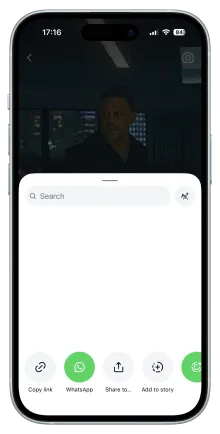
Step 1 - Copy the Instagram Story URL
Detailed steps for Step 1 - Copy the Instagram Story URL
- Within the Instagram app or go to the Instagram Site.
- Find the specific instagram story that you want to download.
- Simply tap the share button on that story and select “Copy Link” to get started. For Web based directly copy the url from search bar.
Step 2 - Paste the Link

- Look for the URL input box at the Top section. It must be well positioned.
- Paste the story URL into our downloader tool’s input box.
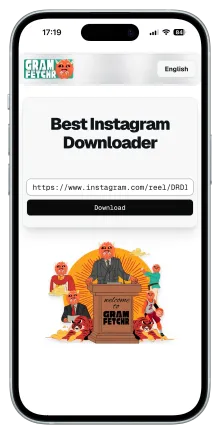
Step 2 - Paste the Link
Detailed steps for Step 2 - Paste the Link
- Look for the URL input box at the Top section. It must be well positioned.
- Paste the story URL into our downloader tool’s input box.
Step 3 - Download the Instagram Story
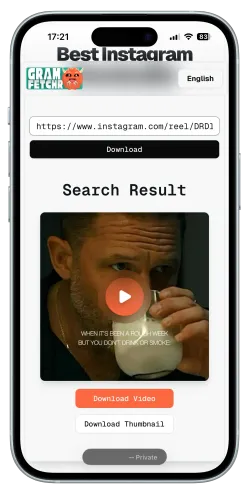
- Click the Download Button, and within seconds it will load the Story Preview you want to download.
- Once you are sure of the Instagram Story, Click the Download Button and the story file will be saved on your device effortlessly.
- The Instagram Stories will be downloaded in the highest quality available, with no watermarks.
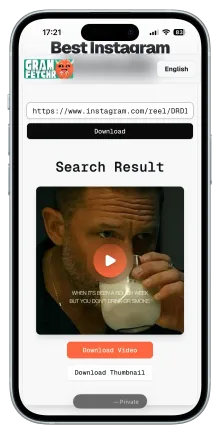
Step 3 - Download the Instagram Story
Detailed steps for Step 3 - Download the Instagram Story
- Click the Download Button, and within seconds it will load the Story Preview you want to download.
- Once you are sure of the Instagram Story, Click the Download Button and the story file will be saved on your device effortlessly.
- The Instagram Stories will be downloaded in the highest quality available, with no watermarks.
Works with public Instagram stories only. GramFetchr never stores your files on our servers after delivery.
Advertisement
SIX REASONS
Why use our Instagram Stories downloader?
Don’t need your Instagram Account login
You never need to connect your Instagram account or hand over any credentials to save an Instagram Story. Your username stays off the viewer list, your password never touches our servers, and there's no OAuth permission screen asking for access to your feed, DMs, or followers.
Original Insta Story Quality Saver
Files come down at the same resolution Instagram stores, with no downscaling or re-encoding. A 1080p instagram story video stays 1080p, insta story photos keep their sharpness, and colors match what the creator uploaded. Screenshots and screen recordings usually strip out 30 to 50 percent of that detail.
Instagram Stories Download in Seconds, Every Time
Most instagram stories finish downloading in under 10 seconds, even on mobile data. Our servers handle the link in the background and send the file straight to your device, with no queue, no waiting room, and no processing screen that stalls for two minutes before timing out.
No Watermarks, No Stamps, No Clutter
No Instagram watermarks, no username stamps, no GramFetchr logos pasted over your download. You get the raw instagram story exactly as it was posted, which matters if you want to save the full frame, edit the clip later, or add it to a personal archive without visual clutter.
Works on Every Device, Nothing to Install
Works on iPhone, Android, PC, and Mac directly in your browser. There's nothing to install, no App Store listing to hunt down, and no desktop software taking up space. Chrome, Safari, Firefox, and Edge all handle the download the same way.
Built With Your Privacy in Mind
No data stored, no tracking cookies, and the poster never gets a notification. We don't log the URLs you paste, we don't build a profile from your session, and nothing about your download activity is shared with Instagram, Meta, or third-party advertisers.
SIDE BY SIDE
GramFetchr vs Other Ways to Save Instagram Stories
| Feature | GramFetchr | Instagram App | Other Story Tools |
|---|---|---|---|
| No Insta Login Required | Yes | No (needs account) | Varies |
| Original IG Story Quality | Yes | Lower (screenshot) | Often Compressed |
| No Watermark | Yes | No (contains username) | Sometimes |
| Speed | Under 10s | Manual | Varies |
| Account Owner Notified | No | Not Sure (Mostly No) | Sometimes |
| Works on Video & Photo Stories | Yes | Yes | Varies |
| Free to Use | Yes | Yes | Often paywalled |
Screenshots lose quality and stamp usernames across the frame, and most other tools either compress files, push you through lock features behind a paywall. GramFetchr keeps it simple: full quality, unlimited Instagram story saves, no cost.
Advertisement
Frequently Asked Questions (FAQs)
Please refer to the list below for some of the most frequent questions or concerns related to the GramFetchr Instagram Stories Downloader. If you feel that we haven't addressed your question yet, please don't hesitate to contact us via email or the message box on our contact page.
Yes, GramFetchr downloads Instagram Stories anonymously, ensuring the original poster is not notified.
If the Story contains music, GramFetchr will download it with audio, preserving the original content.
Users can copy the Story link, visit GramFetchr in a browser, paste the link, and download the Story to an Android, iPhone or even on PC.
Yes, GramFetchr saves Instagram Stories in HD quality, depending on the original upload resolution.
Instagram Stories are available for 24 hours, but if they are added to Story Highlights, they can be downloaded even after that.
No, GramFetchr only allows downloading of public Stories. Stories from private accounts cannot be accessed.
GramFetchr allows you to download multiple Stories at once. In case, Instagram does not allow bulk downloads, but users can download each Story individually using GramFetchr.
Yes, downloaded Stories retain all original elements, including text, stickers, and effects, ensuring they match the original upload.
Yes, GramFetchr is completely safe to use. It does not require any personal information or account login, ensuring a secure and private experience. The platform is free from malware and data tracking.
No, Instagram does not notify users when their story is downloaded using GramFetchr. The process remains completely anonymous, and no account details are required.
No, GramFetchr does not store any downloaded files, links, or user data. All downloads happen in real-time, and once a file is saved, there are no records kept on the platform.
No, GramFetchr does not require logging into an Instagram account. Simply paste the Instagram link, and the content can be downloaded instantly without any authentication.
No, using GramFetchr does not violate Instagram’s terms for viewers. Since the tool operates without requiring login details, there is no risk of an account being suspended or restricted. However, downloaded story should be used responsibly and for personal purposes only.
If GramFetchr fails to download a Story, first ensure that the Instagram Story is public and not from a private account, as private content cannot be accessed. Double-check that the copied link is correct to avoid any errors. If the issue persists, try refreshing the page and attempting the download again. Additionally, clearing your browser cache or switching to a different browser or device may help resolve any technical issues preventing the download.
Errors may occur if the copied link is incomplete or incorrect. Make sure the full Instagram URL is pasted. If the issue continues, try copying the link directly from the Instagram app or web version to avoid formatting errors.
If downloads are slow or not starting, first check your internet connection to ensure it is stable. If the issue continues, try using a different browser or switching between mobile and desktop to see if that improves performance. In some cases, network restrictions or regional limitations may interfere with downloads, and using a VPN might help bypass such restrictions. Additionally, temporary server load can sometimes affect download speed, so if the problem persists, waiting a few minutes and trying again may resolve it.
No, our tool only allows downloads from public instagram accounts due to privacy restrictions.
Downloading Instagram stories using GramFetchr is allowed for personal use. However, users should respect copyright laws and the original creator’s rights. Story should not be used for commercial purposes or redistributed without permission.
Story downloaded through GramFetchr should not be shared without the creator’s consent if it is copyrighted. It is always recommended to give proper credit or obtain permission before reposting on other platforms.
No, GramFetchr is a tool designed for downloading publicly available Instagram stories. The responsibility for how the story is used lies entirely with the user. It is advised to follow Instagram’s terms of service and respect content ownership rights.
READY TO SAVE INSTA STORIES
Never miss an Instagram Story again!
Paste any public Instagram Story link above and save it in full HD before the 24-hour window closes.
For personal use only. Download public Stories and respect creators' privacy and copyright. GramFetchr is not affiliated with Instagram or Meta.
Advertisement
Recent Posts
Looking to buy Instagram followers in 2026? Compare the top 5 trusted providers delivery speed, pros & cons to boost your IG growth safely.


The highest-performing native campaigns are not built around a single advertisement—they are built around a carefully planned user journey

Organize, protect, and grow your social media content with a simple workflow that keeps ideas, files, backups, and posting plans under control.
Instagram Reels not downloading? Here are the real reasons why some Reels block downloads, and exactly what you can do to save them.
Learn how to use AI auto caption on downloaded Instagram videos and Reels. Add subtitles fast with the best free tools available in 2026.

Discover the best aspect ratio and resolution for downloaded Instagram Reels for TikTok, YouTube Shorts, Facebook & more. Repurpose smarter in 2026.