Instagram Reels Downloader
Advertisement
WHY & DEFINITION
Why Download Instagram Reels in 2026?
Reels disappear. Creators delete posts, accounts go private, and Instagram's feed algorithm buries content you saved weeks ago. When a Reel is gone, it's gone, unless you downloaded it first.
Instagram's native save feature keeps videos locked inside the app. You can't edit them, share the file directly, or access them without an active account. Screen recording is worse: it captures the UI, drops frame rate, and compresses audio. The result is a lower-quality clip with interface elements burned into the frame.
Watermarks are another problem. Several tools add branding overlays that make the file unusable for editing or cross-posting. And audio compression on re-recorded clips ruins music-driven Instagram reels entirely, the one format where audio quality matters most.
People who download Instagram Reels include:
- Content creators and social media agencies repurposing Reels to TikTok, YouTube Shorts, and Facebook videos
- Marketers collecting trending Reels for competitor research and creative inspiration to get on the trend and go viral
- Educators and coaches saving workout tutorials, lessons, and training clips to promote their business
- Daily Instagram users archiving recipes, music, memes, and entertainment
- Designers and editors pulling reference clips for production work from high-end instagram profiles
As of 2025, Instagram Reels generate an estimated 22% higher engagement rate than standard feed posts, making them the platform's most-watched format. Clean, local downloads let you own, edit, and repurpose that Instagram video content. Whether it's a 30-second clip or a 10-minute insta feed video.
Advertisement
UNDERSTAND HOW IT WORKS
How to Download Instagram Reels?
Using GramFetchr to download Instagram Reels video in original quality takes under a minute. No Instagram account login needed, no software to install. Here's exactly how it works:
Step 1 - Copy the Instagram Reel URL
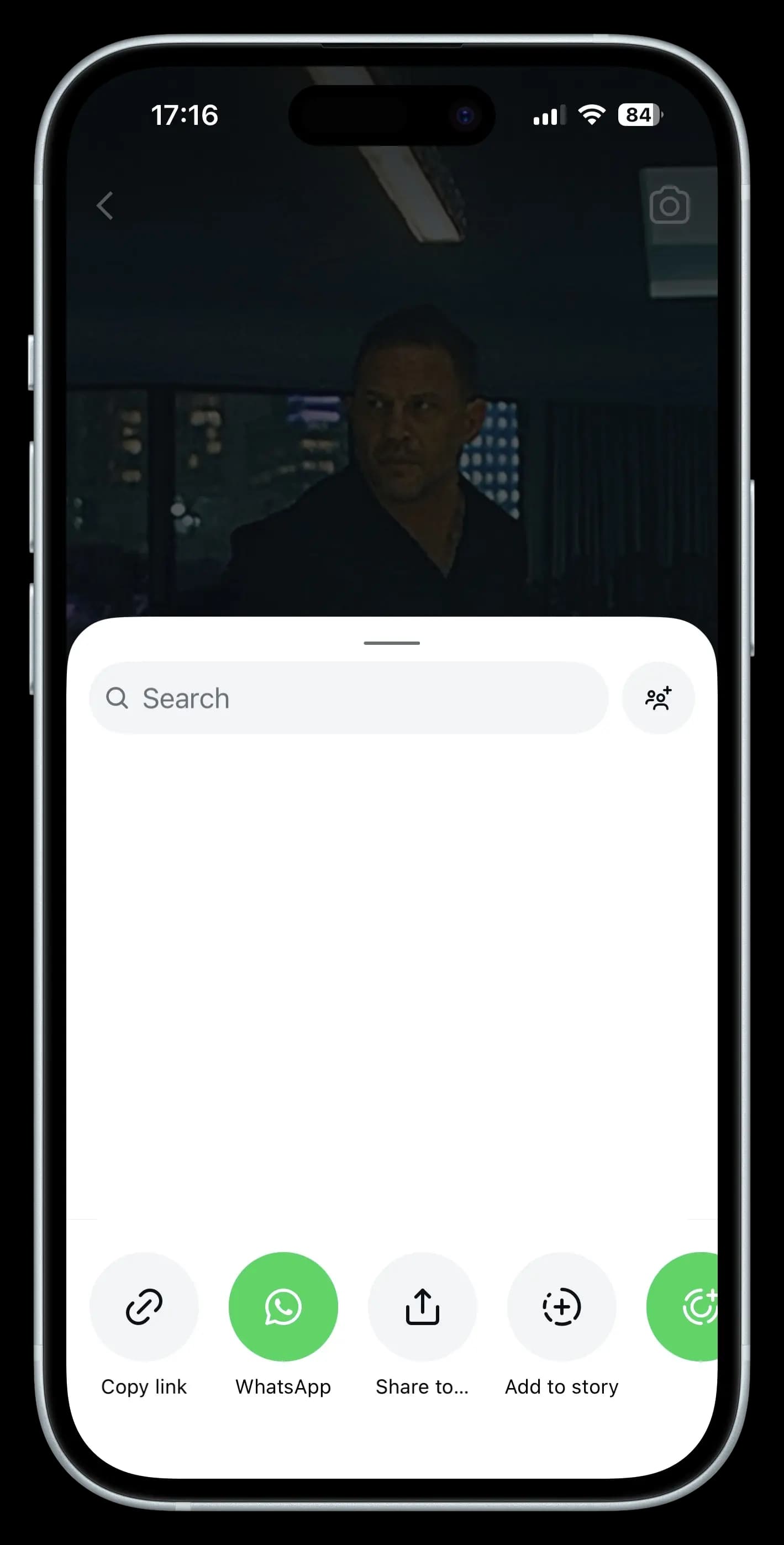
- Within the Instagram app or go to the Instagram Site.
- Find the specific reel that you want to download.
- Simply tap the share button on that Reel Post and select “Copy Link” to get started.
Step 2 - Paste the Link
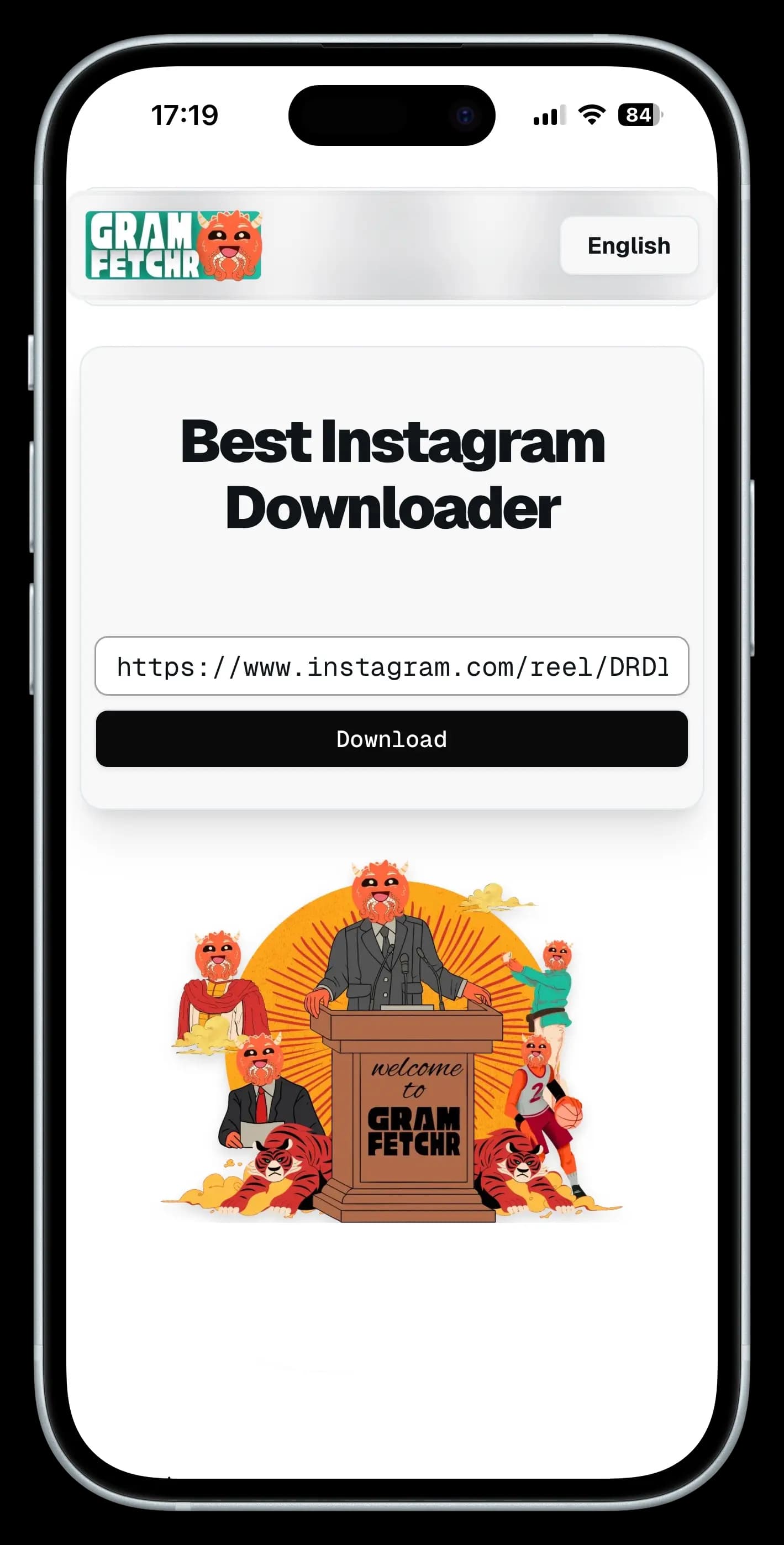
- Look for the URL input box at the Top section. It must be well positioned.
- Paste the Reel URL into our downloader tool’s input box.
Step 3 - Download the Reels Video
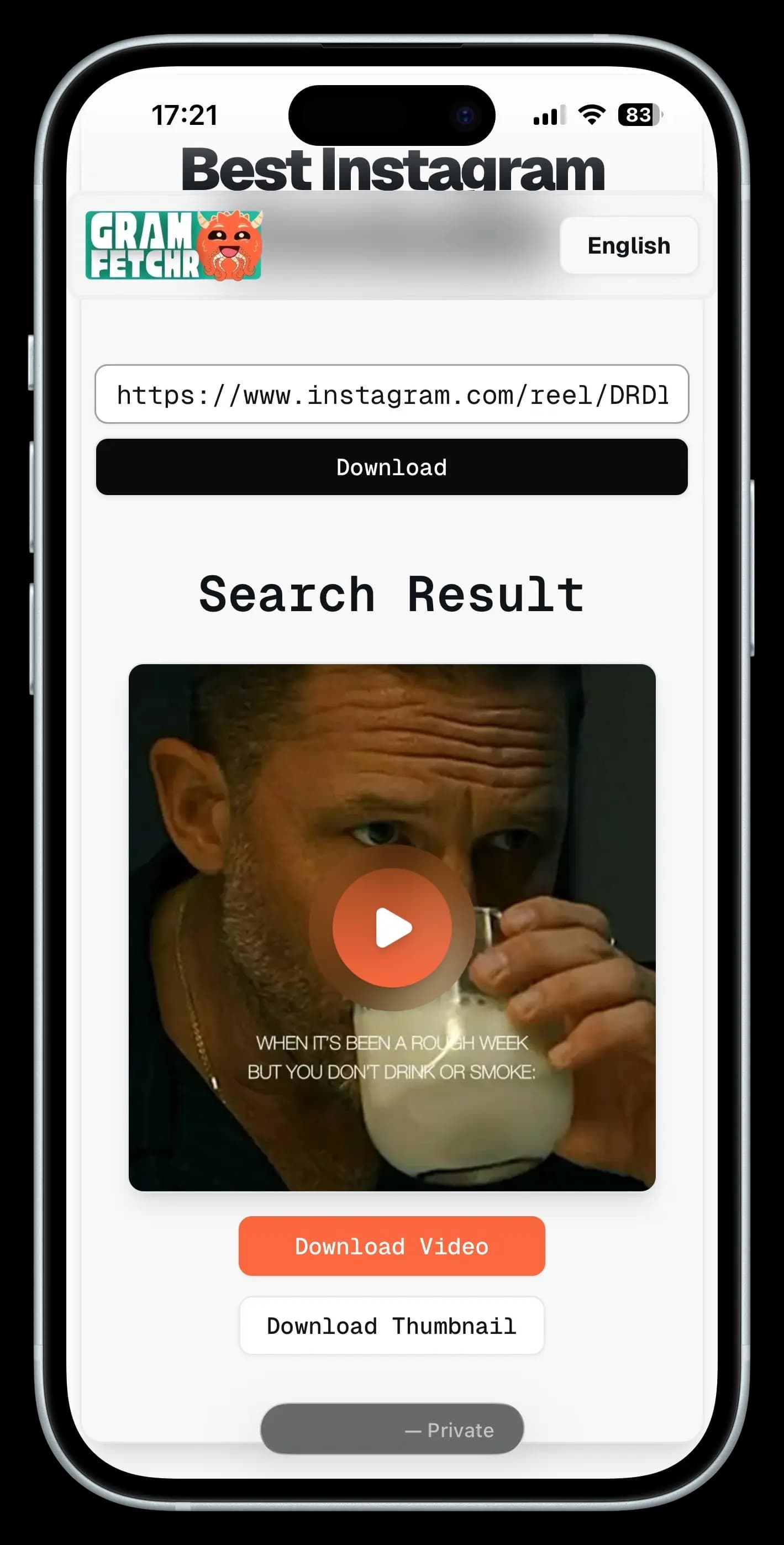
- Click the Download Button, and within seconds it will load the Reel Preview you want to download.
- Once you are sure of the Instagram reel, Click the Download Button and the video file will be saved on your device effortlessly.
- The Reel will be downloaded in the highest quality available, with no watermarks.
Works with publicly available Instagram accounts only. Same three steps work for Reels, feed videos, and regular video posts.
DEFINITION
What is an Instagram Reels Downloader?
An Instagram Reels downloader is a tool that retrieves the original MP4 file directly from Instagram's servers at the highest resolution available. No screen recording, no compression, no watermark added. The video file you get is the same file Instagram hosts.
GramFetchr works as a full Instagram video downloader, not just a Reels tool. It handles longer feed videos and standard video posts using the same process. Paste a link, get the file. No instagram account needed on your end.
SUPPORTED FORMAT
Difference Between Instagram Reels and Instagram Feed Videos
Both formats are fully supported by GramFetchr. Here's how they differ:
| Format | Length | Common Use |
|---|---|---|
| Reels | 15–90 sec | Trends, music, funny short clips |
| Feed Videos | Up to 10 min | Mini vlogs, tutorials, storytelling |
| Video Posts | Varies | Standard shared videos |
One paste box handles all three. No separate IG tools needed. GramFetchr identifies the video type from the link and fetches the correct file format automatically, the process is identical regardless of whether you're downloading a 15-second Instagram Reel or a 45-minute Instagram feed video.
CLEAN OUTPUT
Save Instagram Reels without Watermark
When you use Instagram's native save or a screen recorder, you're stuck with an Instagram watermark burned into the video, distorted audio from your device microphone, and significantly reduced resolution. For casual viewers that's frustrating. For content creators and agencies it's completely unusable.
GramFetchr solves this by going directly to the source. It retrieves the raw, unprocessed MP4 from Instagram's own servers for any publicly available Insta Reel. The result is a clean, professional-grade video with no watermarks, no compression artifacts, and no missing audio. Whether you're repurposing content for TikTok, YouTube Shorts, or a client presentation, your files are edit-ready the second they download.
The process is completely hassle-free. Paste a URL from any public Instagram account, click download, and you have a watermark-free Reel on your device in seconds. It really is that simple, and that's why GramFetchr is the most trusted free Instagram Reel downloader with no watermark in 2026.
HONEST COMPARISON
GramFetchr vs Other Ways to Save Instagram Videos
| Features | GramFetchr | Instagram Native Save | Screen Recording |
|---|---|---|---|
| Watermark-free | Yes | No | No |
| Original HD Video Quality | Yes | Compressed | Device-dependent |
| Original Video Audio | Yes | Limited | Often distorted |
| Reels support | Yes | Yes (app only) | Yes |
| Feed video support | Yes | Limited | Real-time only |
| Download speed | Under 10 sec | N/A | Real-time |
| Instagram Login required | No | Yes | No |
| Free and unlimited downloads | Yes | In-app only | Free |
| Works on all devices | Yes (Completely Web-based) | App only | Device-dependent |
Legal
Is It Legal to Download Instagram Videos and Reels?
GramFetchr only processes publicly available content. It cannot access private instagram accounts or restricted posts. The tool is intended for personal use, offline archiving, and fair-use repurposing.
When republishing instagram downloaded videos, users are responsible for crediting the original creator and complying with applicable copyright law. Downloading does not transfer ownership of the content.
TROUBLESHOOTING
Troubleshooting Common Instagram Reels Download Issues
Most instagram videos download failures fall into six categories. Match your error below for the fix.
Reels Link Not Working or Invalid URL Error
The copied post link includes tracking parameters, is a share-sheet short link, or points to a non-video post.
- Open the Reel or video in the Instagram app or web browser
- Tap the share button and select Copy Link.
- Paste that link directly into GramFetchr
Private Account or Content Unavailable Error
The post belongs to a private instagram account, has been deleted, or is region-restricted.
- GramFetchr only downloads public content
- Verify the link opens in a browser without logging in to Instagram
- If the post was recently deleted, recovery is not possible
- Region-locked content cannot be accessed regardless of location
Download Starts But File Is Corrupted or Won't Play
Interrupted connection, incomplete download, or incompatible media player.
- Re-download on a stable connection
- Open the file in VLC, which supports all MP4 variants
- Clear your browser cache and retry the download
- On iOS, save to the Files app first, then move to Photos
No Audio in Downloaded IG Reel
The original Reel used licensed music that Instagram strips for non-logged-in requests, or the creator manually removed audio.
- Check whether the original Reel plays with sound in a private browser window
- If muted at source, audio cannot be recovered
- For music-licensed Reels, the downloaded file may contain a silent audio track, this is an Instagram server-side limitation, not a GramFetchr issue
Download Button Does Nothing or Page Freezes
Browser extension conflict (ad blockers, privacy tools), outdated browser, or JavaScript disabled.
- Disable ad blockers for gramfetchr.com
- Update your browser to the latest version
- Try incognito or private mode
- Switch browsers: Chrome, Firefox, Safari, and Edge are all supported
Slow Download Speeds
Instagram CDN rate-limiting, peak traffic periods, or local network throttling.
- Wait 30–60 seconds and retry
- Switch from Wi-Fi to mobile data, or vice versa
- Avoid downloading during peak hours
Still Stuck?
Report the exact error message and the Reel link to our email or use the contact form. We respond within 24 hours.
Frequently Asked Questions (FAQs)
Please refer to the list below for some of the most frequent questions or concerns related to the GramFetchr Instagram Reels Downloader. If you feel that we haven't addressed your question yet, please don't hesitate to contact us via email or the message box on our contact page.
Download Process
How to download Instagram Reels online for free?
Downloading Instagram Reels online is easy with GramFetchr. Just copy the Reel link, paste it into the downloader, and save the video instantly without any cost.
Does the IG downloader support private Reels?
No, GramFetchr only works with public Instagram Reels. Instagram’s privacy settings restrict the downloading of private account content.
How many Instagram Reels can be downloaded?
GramFetchr provides unlimited downloads, allowing users to save as many Instagram Reels as they want without restrictions.
Can Reels be downloaded on iPhone and Android?
Yes, Instagram Reels can be saved on both iPhone and Android devices using GramFetchr. The tool is accessible through any browser without needing an app.
What format will the downloaded Instagram Reels be In?
Instagram Reels are typically saved in MP4 format, ensuring compatibility with all devices, media players, and editing software.
How to download Instagram Reels with audio?
GramFetchr downloads Reels with original audio, maintaining the full experience of the video as posted on Instagram.
Can downloaded Reels be shared on other social media platforms?
Yes, once saved using GramFetchr, Instagram Reels can be shared on various platforms like Facebook, WhatsApp, and Twitter, but it’s important to credit the original creator if required.
Can Instagram Reels be downloaded in 4K quality?
The download quality depends on the original upload resolution. GramFetchr saves Reels in the highest available quality, but if the video was not uploaded in 4K, it cannot be downloaded in 4K.
How to download Instagram Reels with captions?
Currently, GramFetchr downloads only the video content. If captions are included in the Reel itself, they will be saved along with the video. However, Instagram’s overlay captions may not be included.
Will the downloaded IG Reel have any watermark?
No, the downloaded reels will not have any GramFetchr watermarks. You will get the original content as it is.
Privacy and Security
Is GramFetchr safe to use for downloading Instagram reels?
Yes, GramFetchr is completely safe to use. It does not require any personal information or account login, ensuring a secure and private experience. The platform is free from malware and data tracking.
Will the Instagram user be notified if their content is downloaded?
No, Instagram does not notify users when their content is downloaded using GramFetchr. The process remains completely anonymous, and no account details are required.
Does GramFetchr store any downloaded reels or user data?
No, GramFetchr does not store any downloaded files, links, or user data. All downloads happen in real-time, and once a file is saved, there are no records kept on the platform.
Do I need to log in to my Instagram account to use GramFetchr?
No, GramFetchr does not require logging into an Instagram account. Simply paste the Instagram link, and the content can be downloaded instantly without any authentication.
Can downloading Instagram reel through GramFetchr lead to account suspension or restrictions?
No, using GramFetchr does not violate Instagram’s terms for viewers. Since the tool operates without requiring login details, there is no risk of an account being suspended or restricted. However, downloaded reel should be used responsibly and for personal purposes only.
Technical Issues
What should be done if GramFetchr fails to download Instagram Reels?
If GramFetchr fails to download a Reel, first ensure that the Instagram Reel or video is public and not from a private account, as private content cannot be accessed. Double-check that the copied link is correct to avoid any errors. If the problem persists, try refreshing the page and attempting the download again. Additionally, clearing your browser cache or switching to a different browser or device may help resolve any technical issues preventing the download.
Why is GramFetchr showing an error when pasting an Instagram reels link?
Errors may occur if the copied link is incomplete or incorrect. Make sure the full Instagram URL is pasted. If the issue continues, try copying the link directly from the Instagram app or web version to avoid formatting errors.
What to do if GramFetchr downloads are too slow or not starting?
If downloads are slow or not starting, first check your internet connection to ensure it is stable. If the issue continues, try using a different browser or switching between mobile and desktop to see if that improves performance. In some cases, network restrictions or regional limitations may interfere with downloads, and using a VPN might help bypass such restrictions. Additionally, temporary server load can sometimes affect download speed, so if the problem persists, waiting a few minutes and trying again may resolve it.
Can I download Reels from Private accounts?
No, our tool only allows downloads from public instagram accounts due to privacy restrictions.
Legal
Is it legal to download Instagram Reels?
Downloading Instagram Reels using GramFetchr is allowed for personal use. However, users should respect copyright laws and the original creator’s rights. Content should not be used for commercial purposes or redistributed without permission.
Can downloaded Instagram reels be shared elsewhere?
Content downloaded through GramFetchr should not be shared without the creator’s consent if it is copyrighted. It is always recommended to give proper credit or obtain permission before reposting on other platforms.
Does GramFetchr have any responsibility for how users use downloaded reels?
No, GramFetchr is a tool designed for downloading publicly available Instagram reels. The responsibility for how the reel is used lies entirely with the user. It is advised to follow Instagram’s terms of service and respect content ownership rights.
START DOWNLOADING NOW
Ready to save clean Instagram Reels and Videos instantly?
Join 2 million creators and everyday users saving public instagram Reels in original HD quality, for free and Instantly to their devices.