Instagram Reels Thumbnail Downloader
Advertisement
CONTEXT
What are Instagram Reels Thumbnails?
An Instagram Reels thumbnail is the static preview image shown before a Reel plays. It acts as the cover image that represents the Reel across feeds, profile grids, and Explore pages.
Creators carefully choose their Reel cover because it drives the first impression and directly affects click-through rates. A strong thumbnail can make the difference between a scroll-past and a view.
GramFetchr extracts the original high-resolution version of any Reel thumbnail without downloading the full video. You get the clean cover image exactly as it was uploaded, free of compression artifacts, UI overlays, or username watermarks.
Use Cases
Why Download Reel Thumbnail Images?
If you work with visual content, you already know the pain of trying to save a clean Reel cover from Instagram. Screenshots come out blurry, covered in play buttons, profile names, or engagement icons. Designers, creators, and marketers need the original asset, not a degraded copy.
Real Use Cases
- Creating better custom social media thumbnails based on proven styles
- Repurposing content across platforms like YouTube, TikTok, and Pinterest
- Building mood boards or visual inspiration libraries
- Designing promotional graphics, YouTube thumbnails, or Pinterest pins
- Archiving high-quality visual assets from favorite Reels
- Sourcing reference assets for freelance thumbnail design work
- Auditing competitor Reel cover styles for brand strategy decisions
Advertisement
Process overview
How to Download Instagram Reels Thumbnail?
Three Steps. Copy, Paste, Click Download
Step 1 - Copy the Instagram Post URL
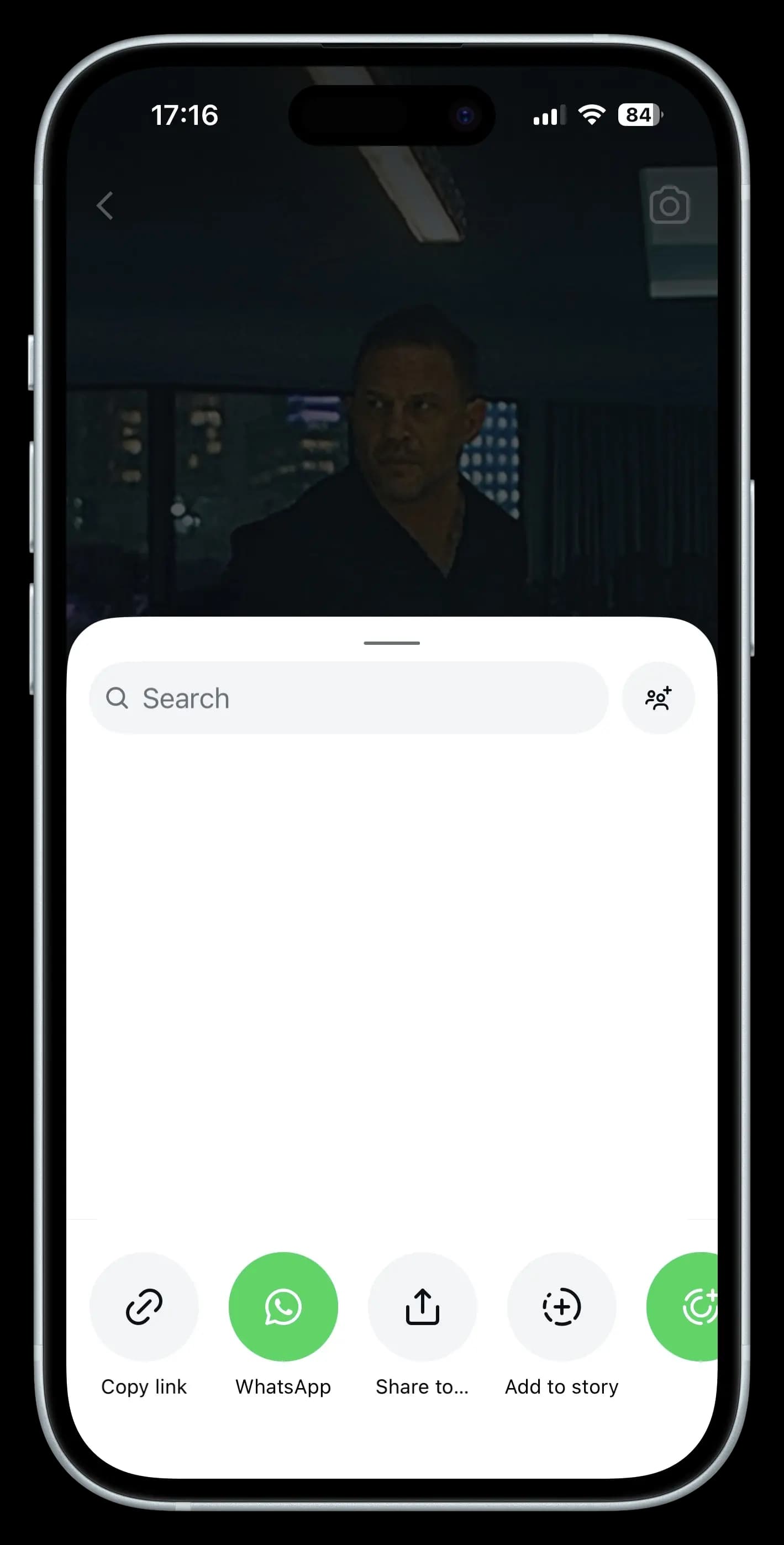
- Within the Instagram app or go to the Instagram Site.
- Find the specific instagram reel or video thumbnail that you want to download.
- Simply tap the share button on that post and select “Copy Link” to get started.
Step 2 - Paste the Link
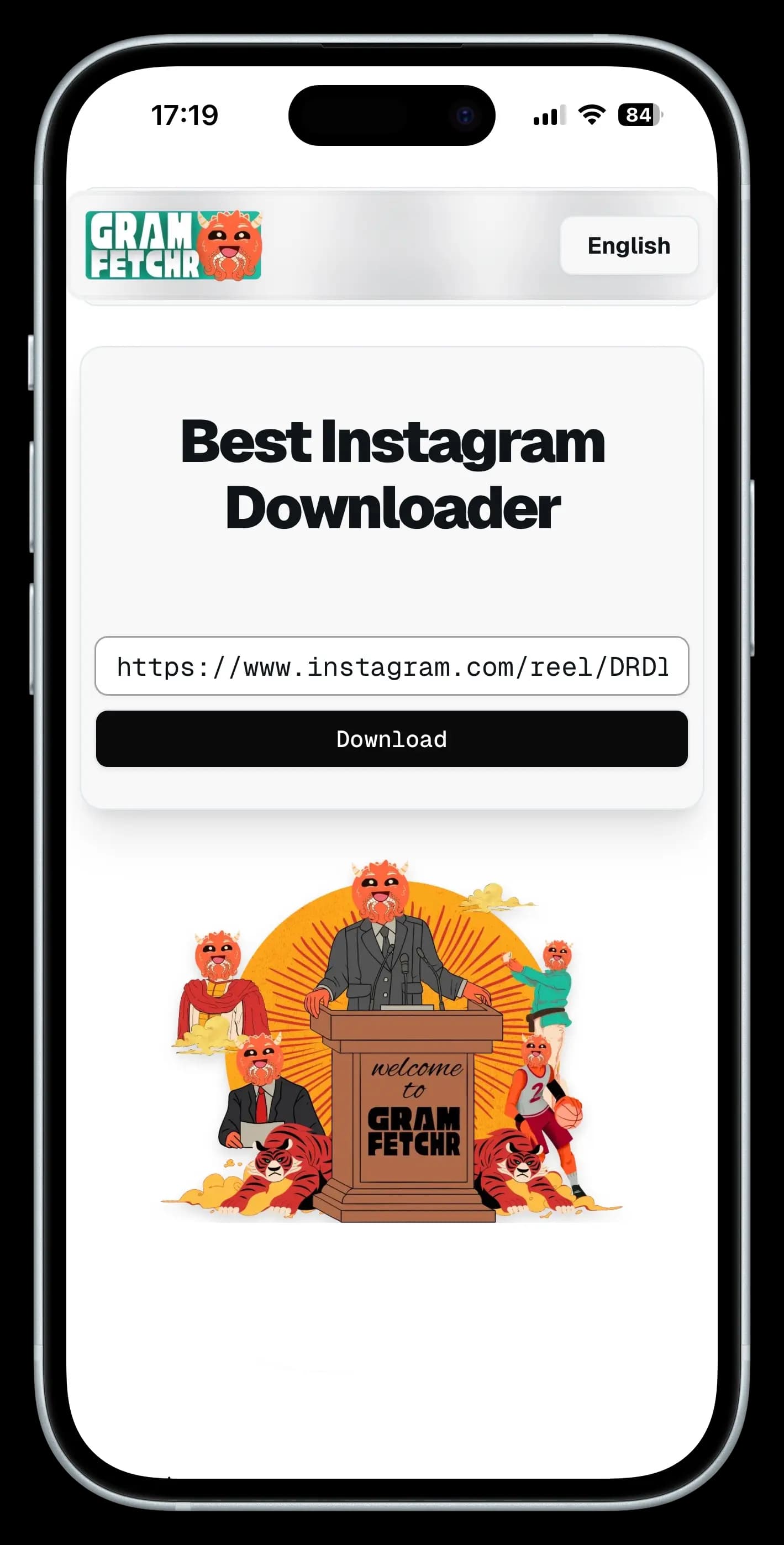
- Look for the URL input box at the Top section. It must be well positioned.
- Paste the post URL into our downloader tool’s input box.
Step 3 - Download the Reels Thumbnail
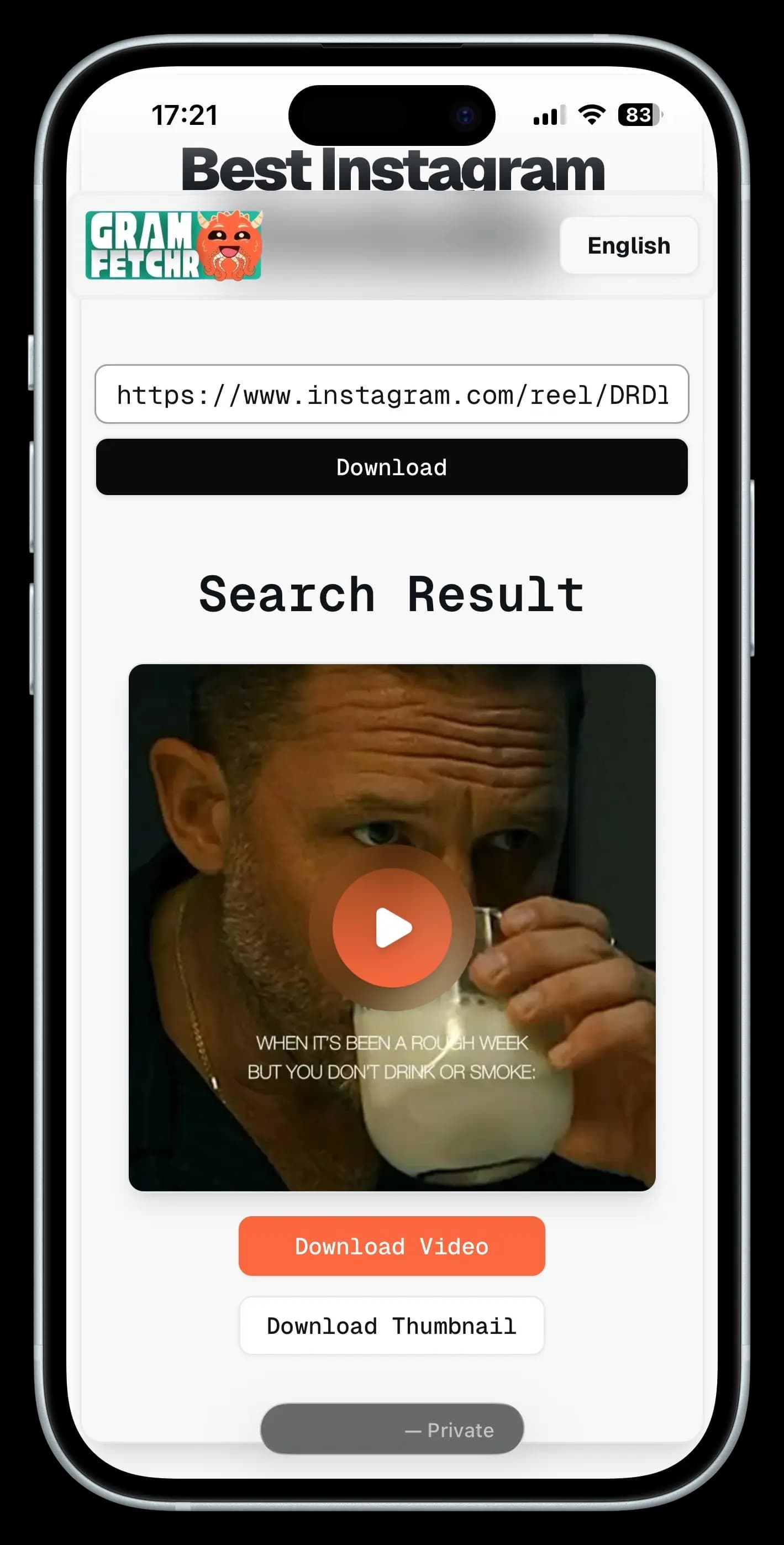
- Click the Download Button, and within seconds it will load the Picture Preview you want to download.
- Once you are sure of the Thumbnail Photo, Click the Download Button and the Image file will be saved on your device effortlessly.
- The Instagram Thumbnails will be downloaded in the highest quality available, with no watermarks.
Works on any public Instagram Reel or Video. Private accounts are not supported.
Why Us
Why Creators Choose GramFetchr as Their Reel Thumbnail Downloader?
Built for designers and creators who need to extract a clean original thumbnail Image, not a watermarked screenshot.
Pixel-Perfect Source Quality
Pull the Instagram cover Image at its full uploaded resolution, untouched by screenshot compression or device downscaling.
Zero UI Clutter
Skip the play icon, profile name, and engagement overlays. You get the raw frame thumbnail image, nothing layered on top.
Built for Speed
From paste to download in under ten seconds. No queues, no captchas, no waiting screens.
Works without an Account
No sign-up, no Instagram login, no browser extension. Open the page, paste a public Reel link, done.
Drop straight Into your Workflow
Files land in standard formats, ready to open in Photoshop, Canva, Figma, or whichever design tool you use.
Nothing kept, Nothing Tracked
We do not log URLs, store extracted insta thumbnail images, or track your activity. The download is yours and only yours.
COMPARISON
GramFetchr vs Other Instagram Thumbnail Saving Methods
Here is how GramFetchr stacks up against the usual ways people try to save Reel covers.
| Feature | GramFetchr IG Thumbnail Tool | Screenshot Method | Other Tools |
|---|---|---|---|
| Cover Image Resolution | Original High-Res | Low (device-dependent) | Varies |
| Clean (No Watermark) | Yes | Usually has overlays | Sometimes |
| Saving Speed | 5-10 seconds | Manual effort | Varies |
| No Login Required | Yes | Yes | Often No |
| Download Limit | Absolutely Not (Unlimited) | No | Yes (Often No) |
GramFetchr gives you the original instagram thumbnail quality without watermarks, logins, or the manual cleanup that other methods demand.
Frequently Asked Questions (FAQs)
Please refer to the list below for some of the most frequent questions or concerns related to the GramFetchr Instagram Reels Thumbnail Downloader. If you feel that we haven't addressed your question yet, please don't hesitate to contact us via email or the message box on our contact page.
Download Process
How to download Instagram Reels thumbnail image?
Users can download Instagram Reels thumbnails by copying the reel URL and pasting it into GramFetchr’s Reels Thumbnail Downloader.
Can Instagram thumbnail images be saved in high resolution?
Yes, GramFetchr preserves the original resolution of the thumbnail, offering downloads in HD quality when available.
Is there a tool to extract Instagram Reel thumbnails?
Yes, GramFetchr acts as an efficient tool to extract and download Reel cover images in just one click.
Are Instagram Reels preview images downloadable without logging in?
Absolutely. GramFetchr allows downloading Instagram Reels preview images without needing to log in.
How to get a Reel cover photo from Instagram?
Simply copy the Reel's URL and paste it into the GramFetchr tool to get the cover photo instantly.
Can I download Reel thumbnails on mobile devices?
Yes, GramFetchr is fully optimized for Android and iOS, making it easy to download on any mobile browser.
Do Instagram Reel thumbnails have watermarks?
No, thumbnails downloaded using GramFetchr are clean and watermark-free, preserving the original visual.
Can I download multiple Reel cover images at once?
Currently, GramFetchr supports one Reel thumbnail at a time, ensuring high-quality downloads every session.
Why do some Reel thumbnails appear blurry after download?
If the original Reel thumbnail was low quality, GramFetchr will reflect that. It downloads as per the original source quality.
Do Instagram thumbnails include text or overlays?
Instagram thumbnails may contain text or overlays added by the creator. GramFetchr downloads them as-is from the platform.
Privacy and Security
Is GramFetchr safe to use for downloading Instagram thumbnails?
Yes, GramFetchr is completely safe to use. It does not require any personal information or account login, ensuring a secure and private experience. The platform is free from malware and data tracking.
Will the Instagram user be notified if their instagram reel thumbnail is downloaded?
No, Instagram does not notify users when their reel cover is downloaded using GramFetchr. The process remains completely anonymous, and no account details are required.
Does GramFetchr store any downloaded thumbnails or user data?
No, GramFetchr does not store any downloaded files, links, or user data. All downloads happen in real-time, and once a file is saved, there are no records kept on the platform.
Do I need to log in to my Instagram account to use GramFetchr?
No, GramFetchr does not require logging into an Instagram account. Simply paste the Instagram link, and the content can be downloaded instantly without any authentication.
Can downloading Instagram reel previews through GramFetchr lead to account suspension or restrictions?
No, using GramFetchr does not violate Instagram’s terms for viewers. Since the tool operates without requiring login details, there is no risk of an account being suspended or restricted. However, downloaded thumbnails should be used responsibly and for personal purposes only.
Technical Issues
What should be done if GramFetchr fails to download Instagram Reels Cover?
If GramFetchr fails to download a thumbnail, first ensure that the Instagram reel or video is public and not from a private account, as private content cannot be accessed. Double-check that the copied link is correct to avoid any errors. If the issue persists, try refreshing the page and attempting the download again. Additionally, clearing your browser cache or switching to a different browser or device may help resolve any technical issues preventing the download.
Why is GramFetchr showing an error when pasting an Instagram reels thumbnail link?
Errors may occur if the copied link is incomplete or incorrect. Make sure the full Instagram URL is pasted. If the issue continues, try copying the link directly from the Instagram app or web version to avoid formatting errors.
What to do if GramFetchr downloads are too slow or not starting?
If downloads are slow or not starting, first check your internet connection to ensure it is stable. If the issue continues, try using a different browser or switching between mobile and desktop to see if that improves performance. In some cases, network restrictions or regional limitations may interfere with downloads, and using a VPN might help bypass such restrictions. Additionally, temporary server load can sometimes affect download speed, so if the problem persists, waiting a few minutes and trying again may resolve it.
Can I download IG Video thumbnails from Private accounts?
No, our tool only allows downloads from public instagram accounts due to privacy restrictions.
Legal
Is it legal to download Instagram Reel cover photos?
Downloading Instagram reel cover using GramFetchr is allowed for personal use. However, users should respect copyright laws and the original creator’s rights. Thumbnail should not be used for commercial purposes or redistributed without permission.
Can downloaded Instagram Reel Image be shared elsewhere?
Thumbnails downloaded through GramFetchr should not be shared without the creator’s consent if it is copyrighted. It is always recommended to give proper credit or obtain permission before reposting on other platforms.
Does GramFetchr have any responsibility for how users use downloaded thumbnails?
No, GramFetchr is a tool designed for downloading publicly available Instagram thumbnails. The responsibility for how the thumbnail is used lies entirely with the user. It is advised to follow Instagram’s terms of service and respect content ownership rights.
GET STARTED NOW
Download high-quality Reels thumbnails instantly
Free, fast, and Unlimited. Paste any public Reel link and get the original Instagram cover image in seconds, ready for editing, repurposing, or inspiration.
For personal and creative use. Always respect original creators' work when repurposing content.